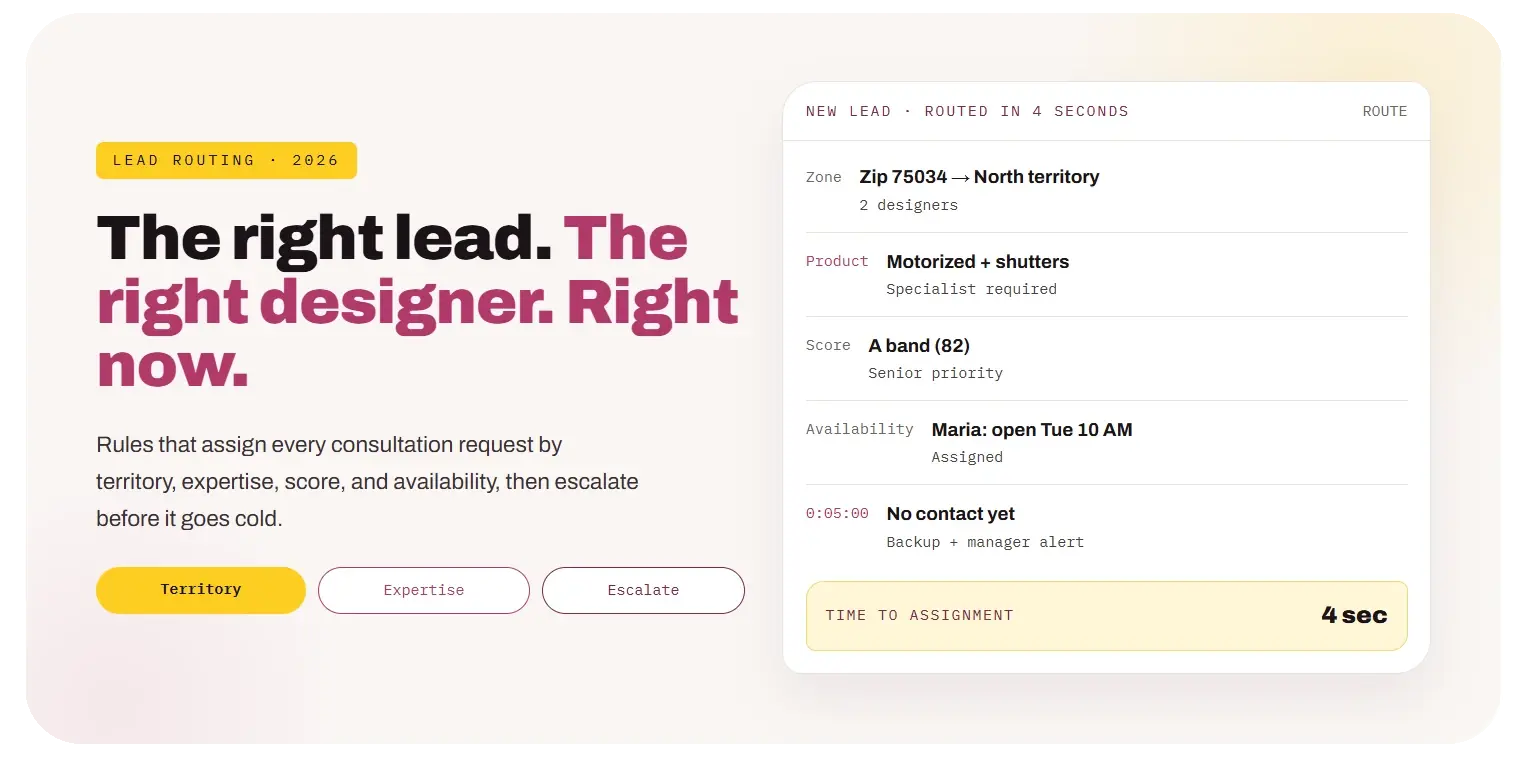
Lead Routing for Window Treatment Companies: Assign Every Consultation Request to the Right Designer in Minutes

← BACK TO LOCAL BLOG
All topics Websites & Conversion
10 Min Read

Lead Routing for Window Treatment Companies: Assign Every Consultation Request to the Right Designer in Minutes

Lead Routing for Window Treatment Companies: Assign Every Consultation Request to the Right Designer in Minutes

A dealer with five designers gets a lead from Plano at 2:14 PM. The office manager is on a call. Two designers see the notification and each assume the other will take it. At 4:30 someone finally calls. The homeowner already booked with a competitor.

Once a dealer has more than two or three designers, “whoever grabs it” stops working. Leads get cherry-picked, some sit untouched, travel time balloons, and the best projects do not reliably reach the people best suited to win them.

Key takeaways
• Route automatically within seconds of a lead arriving; manual assignment is the most common cause of slow first contact. • Combine rules in order: territory first, then product expertise, then lead score, then availability or round-robin. • Every assignment needs an escalation timer: reassign or alert if there is no contact within a set number of minutes. • Fairness matters: track distribution and close rates per designer so routing does not quietly favor anyone. • Measure time to assignment, time to first contact, and booked rate by designer and by rule.

This guide covers the routing models, the rules for territory, expertise, score, and availability, escalation timers, fairness, the CRM setup, and how to measure whether routing is working.

01

What Is Lead Routing and Why Does It Matter?

Short answer

Lead routing is the set of rules that decides which designer owns a new consultation request and how fast they must act on it. Good routing gets the right person on the lead in minutes, not hours.

Routing is invisible when it works and very expensive when it does not. Every minute a lead waits for someone to claim it is a minute your competitors can use. As our speed to lead guide shows, response time is one of the strongest drivers of whether a lead ever books.

Routing also decides quality of response. A homeowner asking about motorized shades with home automation should not go to a designer who has never sold motorization. A builder with twelve homes should not land with a newer designer while a senior one sits open.

For a one- or two-designer dealer, a shared inbox may be enough. Once you have three or more designers, multiple territories, or a showroom plus field team, written routing rules become necessary.

02

What Routing Models Can You Use?

Short answer

Four common models: round-robin, territory, skills-based, and availability-based. Most dealers combine them in a fixed order.

Model
Round-robin
How it works
Leads rotate evenly through the team
Strength
Simple and fair
Weakness
Ignores location and expertise
Model
Territory
How it works
Zip codes or areas assigned to designers
Strength
Cuts travel time
Weakness
Uneven load when one area spikes
Model
Skills-based
How it works
Products or project types matched to specialists
Strength
Better close rates on complex jobs
Weakness
Specialists can become bottlenecks
Model
Availability-based
How it works
Lead goes to whoever has the next open slot
Strength
Fastest booking
Weakness
Can overload one designer
Model
Weighted
How it works
Rotation adjusted by capacity or performance
Strength
Balances fairness and results
Weakness
Needs regular review

A practical combination: filter by territory, then by skill if the project needs it, then pick by score priority, then rotate or choose by availability among whoever remains. Each step narrows the pool; the last step picks one person.

03

How Should Territory Rules Work?

Short answer

Assign zip codes to territories, assign designers to one or more territories, and keep a fallback for zip codes on the edges.

Step 1
Map zip codes
List every zip code you serve and group them into territories based on drive time, not just distance.
Step 2
Assign designers
Give each territory a primary set of designers and a backup set.
Step 3
Define edges
Mark zip codes at the boundary as shared, so either territory can take them.
Step 4
Handle out-of-area
Route leads outside your service area to the office for a polite referral or a showroom offer.
Step 5
Review quarterly
Rebalance when one territory consistently has more leads than its designers can handle.

Drive time matters more than radius in most metros. A zip code 12 miles away across a highway interchange can be closer in time than one 6 miles away through traffic. If your CRM supports it, map territories using drive-time zones.

Territories also make scheduling easier. When a designer’s day stays within one area, they can fit more consultations. Our AI appointment scheduling guide covers zone-based calendars.

04

How Should Skills and Product Expertise Factor In?

Short answer

Tag each designer with the products and project types they are qualified to sell, and route leads that need those skills only to qualified designers.

Skill tag
Motorization
Routes when the lead mentions
Motorized shades, smart home, automation
Why
Technical questions and integration planning
Skill tag
Shutters
Routes when the lead mentions
Plantation shutters, wood or composite
Why
Measuring and install complexity
Skill tag
New construction
Routes when the lead mentions
Builder, new build, pre-drywall
Why
Timeline coordination and wiring
Skill tag
Commercial
Routes when the lead mentions
Office, restaurant, multi-unit
Why
Different buyers and specs; see commercial marketing
Skill tag
Trade partner
Routes when the lead mentions
Interior designer, builder, contractor referrals
Why
Relationship ownership
Skill tag
Language
Routes when the lead mentions
Spanish or other language preference
Why
Better conversations and trust

Keep skill tags honest. If every designer is tagged for everything, skills routing does nothing. If only one designer can sell motorization, they will become a bottleneck during busy months, which is a training signal, not just a routing problem.

Client result
48booked jobs
For Arcadia Blinds, Dallas–Fort Worth

Leads waiting to be claimed?

Get a free review of your lead routing and response times.

Book a free consultation →
05

How Does Lead Score Change Routing?

Short answer

Use score to decide priority and seniority: A-band leads go to senior designers with faster escalation, lower bands go to the next available designer.

Band
A
Routing rule
Senior or specialist designer in territory
Escalation timer
5 minutes, then manager
Band
B
Routing rule
Next designer in territory rotation
Escalation timer
10 minutes, then backup
Band
C
Routing rule
Any available designer or office coordinator
Escalation timer
15 minutes, then office
Band
D
Routing rule
Office handles politely
Escalation timer
Same day

This depends on a scoring model your team trusts. If you do not have one yet, start with our lead scoring guide. Even a simple model with five criteria makes routing much smarter.

Be careful not to send all A-band leads to one star designer. Spread them across your senior team, and give newer designers some higher-value leads with coaching, or they never learn to close them.

06

How Do Availability and Round-Robin Work Together?

Short answer

After territory, skill, and score filters, pick from the remaining designers by availability first, then by rotation if several are equally available.

✓Respect calendars. Skip designers who are in an appointment, on vacation, or off for the day.
✓Next open slot. When booking online, offer the earliest slot among qualified designers.
✓Rotation for ties. If several are free, rotate so nobody gets every lead.
✓Daily caps. Stop assigning to a designer who already has their maximum consultations.
✓Working hours. Leads that arrive after hours go into a morning queue, or to on-call coverage.

Availability needs live calendar data. If designers keep their schedules outside the CRM, routing will assign leads to people who are busy. Connecting calendars is often the single largest improvement in routing quality.

07

What Escalation Rules Prevent Leads From Going Cold?

Short answer

Every assignment starts a timer. If the designer has not contacted the lead in time, reassign it or alert a backup and manager.

0:00
Assign
Lead assigned. Automated text goes to the lead immediately. Designer gets a push notification.
0:05
First reminder
Designer gets a second alert if no call or text is logged.
0:10
Backup
Backup designer is alerted and can claim the lead.
0:15
Manager
Manager is alerted with the lead summary.
0:30
Reassign
Lead moves to the next designer automatically.

The exact timings depend on your team and lead volume. The principle is constant: no lead should depend on one person noticing one notification. Log every escalation, because frequent escalations for one designer is a coaching conversation, and frequent escalations at one time of day is a coverage gap.

08

How Do You Keep Routing Fair?

Short answer

Track lead count, lead value, and close rate per designer each month, and adjust weights so distribution matches capacity and performance.

Report
Leads assigned per designer
What to check
Roughly in line with capacity and schedule
Report
Average score assigned
What to check
No one consistently gets the weakest leads
Report
Booked and close rate per designer
What to check
Coaching needs and possible routing weights
Report
Escalations per designer
What to check
Responsiveness
Report
Reassignments
What to check
Whether rules are matching leads well

Fairness is not only about morale. If one designer gets better leads, their numbers look better, and you might make decisions about pay or promotion based on routing luck. Clear rules and visible reports remove that doubt.

09

How Do You Set It Up in a CRM?

Short answer

Most CRMs support routing through workflow rules or assignment rules. Build the filters in order and test with sample leads before turning them on.

Step 1
Fields
Add territory, skill needs, score band, and assigned designer fields. Make sure form answers fill them.
Step 2
Designer profiles
Store each designer’s territories, skills, seniority, daily cap, and calendar link.
Step 3
Rules
Create assignment rules in order: territory, skill, score, availability, rotation.
Step 4
Timers
Add escalation workflows that check for logged contact at each interval.
Step 5
Notifications
Push alerts to designers’ phones with the lead summary and a one-tap call button.
Step 6
Test
Run 20 sample leads covering every territory, skill, and band before going live.

Marketplace and phone leads need the same rules. If calls go to whoever picks up, route them through your phone system or AI voice agent so they enter the CRM and get assigned like form leads.

10

What Are the Most Common Routing Mistakes?

Short answer

Manual assignment, no escalation, rules that ignore calendars, everyone tagged for everything, and calls handled outside the CRM.

✕Manual assignment. The office manager becomes a bottleneck, especially at lunch and after hours.
✕No escalation timer. Leads wait until someone happens to notice.
✕Ignoring calendars. Leads go to designers in the middle of a three-hour consultation.
✕Meaningless skill tags. If everyone has every tag, skills routing does nothing.
✕Calls outside the system. Phone leads never get routed or tracked.
✕Never reviewing distribution. Imbalances build quietly for months.

Each of these is fixable in a CRM that supports workflows. The work is mostly deciding the rules, which is a one-hour conversation with your design manager.

11

How Do You Roll It Out in 30 Days?

Short answer

Week 1 define territories and skills, week 2 build fields and rules, week 3 test and turn on escalation, week 4 review distribution and adjust.

Week 1
Define
Map territories by drive time. List designer skills honestly. Decide escalation timings.
Week 2
Build
Create fields, designer profiles, and assignment rules in the CRM. Connect calendars.
Week 3
Test and launch
Run 20 test leads. Turn on routing and escalation. Watch every assignment for a week.
Week 4
Review
Check time to assignment, time to first contact, and distribution. Adjust rules.

Measure before and after. Time to first contact and booked rate should both improve. Track them in the same place as your cost per booked consultation dashboard.

A Lead Routing Audit

Twenty questions about how leads reach your designers

Answer yes or no. Every no is a place a lead may sit unassigned or reach the wrong person.

Assignment

5 items
Are leads assigned automatically?
Does assignment happen within seconds?
Do phone and marketplace leads follow the same rules?
Is there an after-hours rule?
Do out-of-area leads have a defined path?

Rules

5 items
Are territories mapped by drive time?
Are designer skill tags accurate?
Does lead score affect routing?
Does routing check live calendars?
Are daily caps respected?

Escalation

5 items
Does every assignment start a timer?
Is a backup alerted when the timer expires?
Is a manager alerted for A-band leads?
Are leads reassigned automatically?
Are escalations logged?

Review

5 items
Do you track time to assignment?
Do you track time to first contact by designer?
Do you report lead distribution monthly?
Do you compare close rate by designer?
Are routing rules reviewed quarterly?

If several answers are no, leads are reaching designers by luck, not by design. That's fixable.

FAQ

Frequently Asked Questions About Lead Routing

What is lead routing for a window treatment company?+
Lead routing is the set of rules that decides which designer gets each new consultation request, based on factors like territory, product expertise, lead score, and availability, and how quickly they must respond.
Should we use round-robin or territories?+
Most multi-designer dealers combine them: filter by territory first to reduce travel, then use round-robin or availability among the designers in that territory.
How fast should a lead be assigned?+
Automatically, within seconds of arriving. Manual assignment is one of the most common causes of slow first contact.
What happens if a designer does not respond?+
Use escalation timers: remind the designer, then alert a backup, then a manager, and reassign the lead automatically if there is still no contact.
How do we keep routing fair?+
Report leads assigned, average score, booked rate, and close rate per designer each month, and adjust weights to match capacity and performance.
Do phone calls need routing too?+
Yes. Route calls through your phone system or an AI voice agent into the CRM so they are assigned and tracked like form leads.

Stop Leaving Assignment to Chance.

When every lead is assigned in seconds to a qualified designer in the right territory, with a timer behind it, fewer leads go cold and more of your best projects reach the people best suited to win them.

Route by rule. Escalate on time. Review monthly.

For related guides, see speed to lead, lead scoring, and CRM automation and AI.

Yay Blitz helps window treatment companies connect Graphic and Web Design, Paid Local Advertising, and AI Lead Management into one measurable system for getting and converting leads.

If leads wait for someone to claim them, start with a Free Strategy Assessment. We will review your team, territories, and CRM, and design routing rules that fit.